
• Skip to primary navigation
  • Skip to main content
  • Skip to footer
Amersham and Chalfont Hockey Club

Amersham and Chalfont Hockey Club

Men's, Ladies' and Junior Hockey in the Chilterns

  • About ACHC
    • Location
    • Join ACHC
    • Safeguarding
    • ACHC Kit
    • Officials
    • ACHC Policies
    • ACHC AGMs
    • Membership Fees
    • ACHC Honours Board
    • ACHC History
      • Amersham Fixture Cards
      • CSP HC Fixture Cards
    • Charitable Partners
    • Help Needed
  • News Posts
  • Adult Hockey
    • Training
    • Men’s Hockey
    • Ladies’ Hockey
    • Mixed Hockey
    • Back 2 Hockey
  • Junior Hockey
    • Welcome to ACHC Juniors’ Section
    • ACHC Junior Training
    • Junior Safeguarding and Welfare
    • Junior Contacts
    • Flyerz Hockey
    • Fixtures & Competitions
    • Junior Hockey Camps
    • Young Leaders & Umpires
    • Talent Development
    • Junior Kit and Equipment
  • Coaching
  • Umpires
    • Umpire Advice
    • Who Can I Umpire?
    • Umpire Awards
    • Hockey Umpire Links
    • Umpire Radios
    • Umpire Photos
  • More
    • Sponsorship Opportunities
    • Help Needed
    • First Aid
    • Easyfundraising
    • Teamo Registration Guides and GMS
    • Teamo for Captains
    • Teamo on your Desktop
  • Contact
You are here: Home / Teamo for Captains / Before Match Day

Before Match Day

Ahead of a match, you may need to chase players to confirm their availability or their selection, or let the team know that times or other details have changed

Getting players to confirm their availability

In the Advanced Settings for a fixture, Teamo offers the options of sending automatic prompts to players chasing for Availability. But sometimes you may need to chase up on an individual player. To do this, select the fixture from the Calendar and click the Manage link
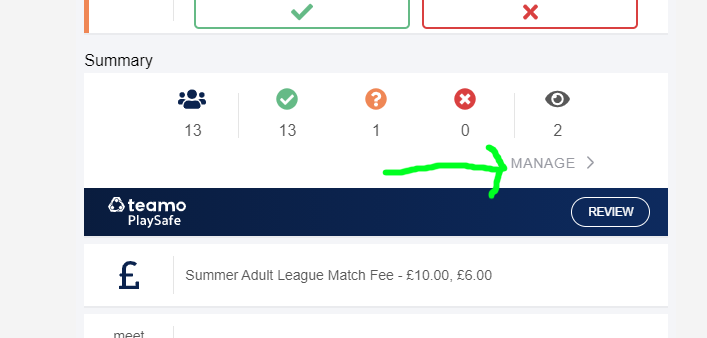
From the list of players, select the individual that you need to chase. You will see a list of options – select Remind Individual and a box will pop up:
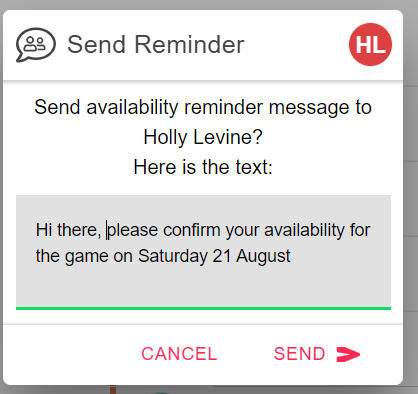
You can edit the text of the message here before you hit ‘Send’.

It’s a similar process to remind players to confirm their selection for the team that will play on match day.

Messaging players about a fixture

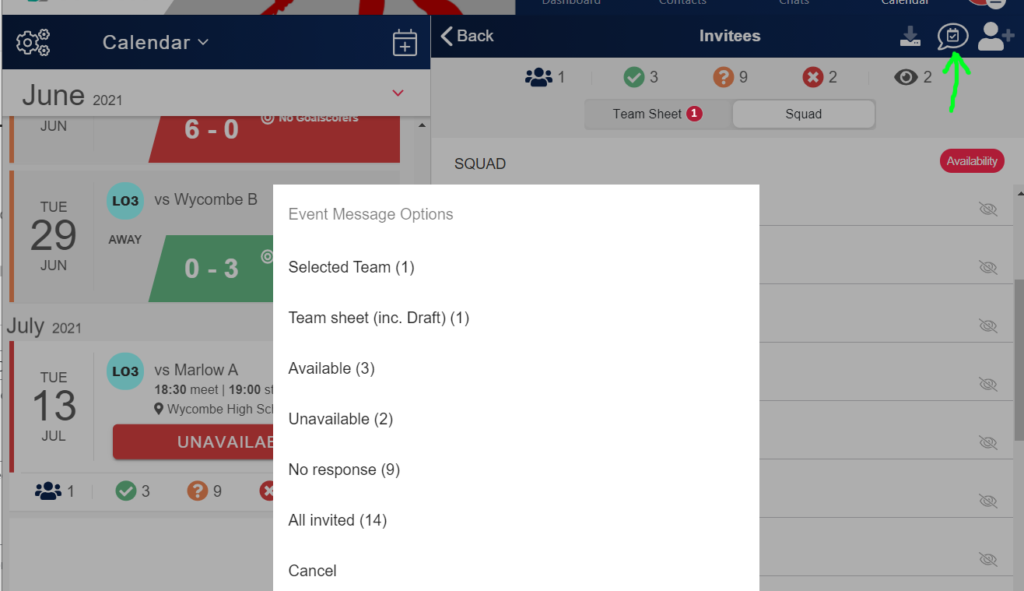
Sometimes you may need to send a message to players in a team or the wider squad concerning a fixture. Click on the Manage link in the fixture and the squad and team sheets will appear. In the top right corner is a speech bubble. Click on this to see the options for which group of players you want to send a message to.
Updating details for a fixture

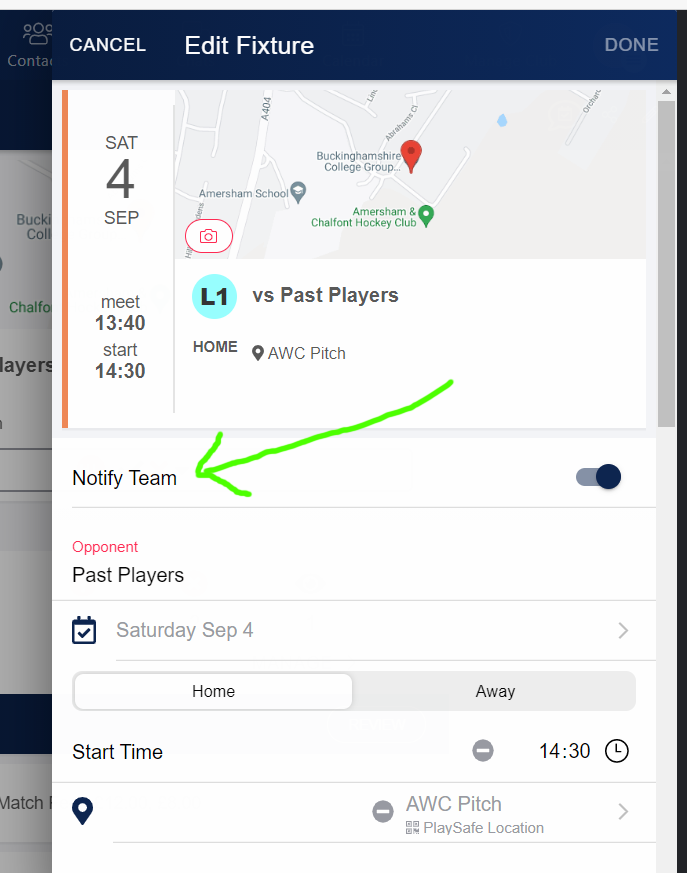
When you need to amend details for a fixture such as times, kit, locations etc, you can make a change by clicking on the fixture in your calendar and then clicking on the pencil icon in the top right corner.

If you want to alert the team that a change has been made, make sure the ‘Notify Team’ option is toggled on:
Footer

Follow Us

  • E-mail
  • Facebook
  • Instagram
  • Twitter
  • YouTube

Contact Us

email : info@achc.org.uk

England Hockey ClubsFirst
England Hockey Clubmark

Thank You To Our Sponsors

 Cater For You  easyfundraising

Copyright © 2026 | Email : info@achc.org.uk | Chalfont Web Design | Log in